> For the complete documentation index, see [llms.txt](https://helpv3.ladipage.vn/llms.txt). Markdown versions of documentation pages are available by appending `.md` to page URLs; this page is available as [Markdown](https://helpv3.ladipage.vn/form-data/cai-dat-chung-cho-form/chon-mot-gia-tri.md).

# Chọn một giá trị

Kiểu trường này đưa ra tất cả các lựa chọn và người dùng lựa chọn bằng cách tích vào ô giá trị, tuy nhiên chỉ được **chọn một ô duy nhất**.&#x20;

Ví dụ khi hiển thị ra Landing Page:

![](https://4163873660-files.gitbook.io/~/files/v0/b/gitbook-x-prod.appspot.com/o/spaces%2FVlMUbaIjYt7SY2R8v2az%2Fuploads%2Fg8TyTLu96bg0L1LyOIda%2Fimage.png?alt=media\&token=fd01af94-7229-4725-8647-38221f6b9561)

Để thiết lập bạn chọn loại trường "Chọn một giá trị". Trong ô điền Danh sách giá trị, bạn điền giá trị sau đó enter xuống dòng để mỗi giá trị là một dòng như ví dụ hình dưới:

<figure><img src="https://4163873660-files.gitbook.io/~/files/v0/b/gitbook-x-prod.appspot.com/o/spaces%2FVlMUbaIjYt7SY2R8v2az%2Fuploads%2FwFk1NmQSLPeDq8SXhiKv%2F1gia%20tr%E1%BB%8B.png?alt=media&amp;token=55eaebdd-1cf4-4b99-a66a-6d3e19cd8c9d" alt=""><figcaption></figcaption></figure>

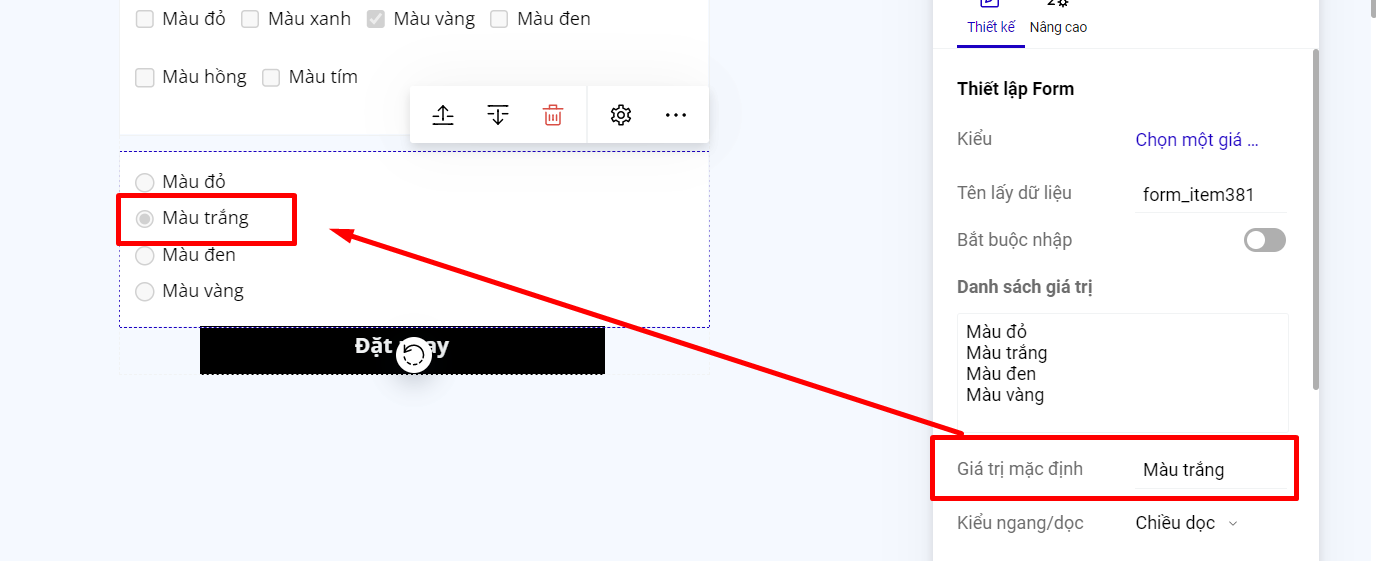
Nếu bạn muốn khi khách hàng truy cập vào landing page, trường Chọn một giá trị của form đăng ký có chọn sẵn 1 giá trị, thì bạn nhập giá trị mặc định là 1 trong các giá trị của danh sách giá trị.

<figure><img src="https://4163873660-files.gitbook.io/~/files/v0/b/gitbook-x-prod.appspot.com/o/spaces%2FVlMUbaIjYt7SY2R8v2az%2Fuploads%2FZURFKbmZNsMU95KpUusQ%2F1%20gi%C3%A1%20tr%E1%BB%8B%202.png?alt=media&amp;token=258f361b-83e8-4446-a599-729be3bfe855" alt=""><figcaption></figcaption></figure>

Bạn có thể sắp xếp các giá trị của trường Chọn một giá trị theo kiểu chiều ngang hoặc chiều dọc.

<figure><img src="https://4163873660-files.gitbook.io/~/files/v0/b/gitbook-x-prod.appspot.com/o/spaces%2FVlMUbaIjYt7SY2R8v2az%2Fuploads%2F6IzPIaBhzalgzAJxN2IT%2F1%20gi%C3%A1%20tr%E1%BB%8B%203.png?alt=media&amp;token=78e1edac-3e6e-495a-bd8d-6a8319404e7b" alt=""><figcaption></figcaption></figure>

{% hint style="warning" %}
**Lưu ý:**&#x20;

Phần hiển thị ô tích chọn trước các giá trị là mặc định, không thể chỉnh sửa và thay đổi.
{% endhint %}